Improvement: SMS replies

It would be good to have an easier way to view SMS replies rather than multiple clicks into the patient's audit file. A way to more easily see and then reply to a patient's SMS reply would help things run smoother.
-
Official comment

You can now see SMS Chat for specific patient or SMS Inbox for all incoming SMS
Comment actions -

Hi David,
Thanks for your suggestion.
I can understand that looking at each patient file can be a very tedious task.2 questions from me:
- Have you got any further suggestions on how to more easily see the dialogue between the clinic and the patient?
- What kind of reply are you wanting to send to your patient?
Kind Regards,
Warren - Have you got any further suggestions on how to more easily see the dialogue between the clinic and the patient?
-
Hi Warren,
These are my suggestions:
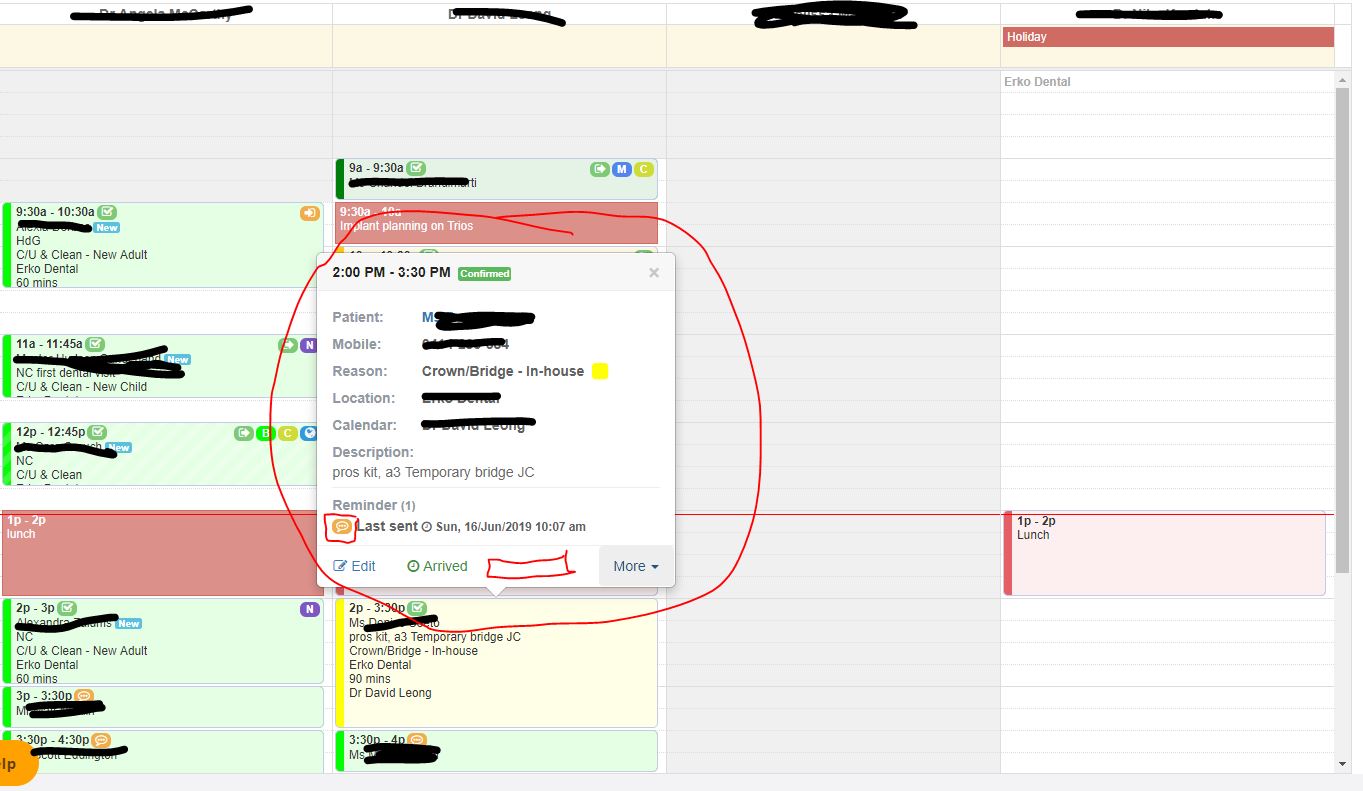
1. A link for SMS replies should be in the patient pop-up screen near where you can press edit or see the arrival status of the patient... that opens up the sms replies automatically or even leads you to a section where you can view replies and also respond to them. You could also press on the patient pop-up and see sms replies just under where the "Reminder" section is.
2. I would like to see a red icon for people who reply "No" to the SMS instead of an orange for all replies or no reply at all. There is green for yes/confirmed, there should be RED for people who reply NO, there should be a yellow for people who respond with something else and an orange for no reply at all. This would let us figure out what is going on with the patient status in the appointment book.
3. Sometimes people want to just respond over SMS and not have to talk to us. Our demographic is young and also most are at work and can't answer their phone readily. It would help if we could have an SMS stream going so that we could just speak about the appointment.
Please sign in to leave a comment.
Comments
3 comments